SGOS2007
 [SGOS2007]
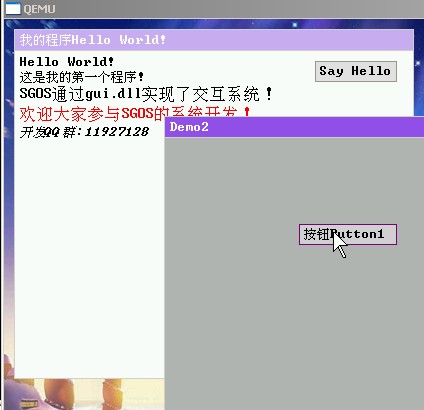
SGOS多任务操作系统终于可以亮相了,这个寒假主要做GUI部分。SGOS的GUI由内核Gfx核心和用户态的gui.dll共同协作,提供用户窗体交互界面。我这次终于掌握了脏矩形技术,这对于没有很好物理支持的机器进行图形处理来说,Very Important!
[SGOS2007]
SGOS启动过程:
硬盘主引导记录 -》主分区引导扇区 -》内核运行环境初始程序 -》SGOS内核 -》 Init.exe(同时加载所需的osdll.dll、gui.dll)
下面是Init.exe的主要源代码:
void* wc, *wc2, *buttonHello;
const char str1[]="Hello World!";
const char str2[]="这是我的第一个程序!";
const char str3[]="SGOS通过gui.dll实现了交互系统!";
const char str4[]="欢迎大家参与SGOS的系统开发!";
const char str5[]="开发QQ群:11927128";
int WindowProcedure(void* window, int message, ULONG param1, ULONG param2)
{
    char keychar[2]="";
    switch( message )
    {
        case WM_MBUTTONDBLCLK:
            PostQuitMessage(0);
            break;
        case WM_KEYDOWN:
            keychar[0]=param1;
            printf("You press key [%X], char: %s\n", param2, keychar );
            if( param1=='c' )
            {
                void* parent = GetClient(window);
                void* button = CreateButton(parent, "按钮Button1", 0, rand()%350, rand()%300 );
                printf("CreateButton: 0x%X\n", button );
            }
            break;
        case WM_LBUTTONUP:
            if( window==buttonHello )
            {
                PBitmap bitmap = GetWindowBitmap(wc);
                DrawText( bitmap, str1, strlen(str1), 5, 5, FONT_MINI_SIZE, BLACK, 0 );
                DrawText( bitmap, str2, strlen(str2), 5, 20, FONT_MINI_SIZE, BLACK, 0 );
                DrawText( bitmap, str3, strlen(str3), 5, 35, FONT_NORMAL_SIZE, BLACK, 0 );
                DrawText( bitmap, str4, strlen(str4), 5, 55, FONT_NORMAL_SIZE, RED, 0 );
                DrawText( bitmap, str5, strlen(str5), 5, 75, FONT_MINI_SIZE, BLACK, TEXT_RIGHTSLANT );
                RefreshWindow( wc, NULL );
            }
        default:  // for messages that we don't deal with
            return DefWindowProc (window, message, param1, param2);
    }
    return 0;
}
int TestWC()
{
    wc = CreateWindowClass(
        NULL,  //父窗体 NULL表示桌面
        "我的程序Hello World!", //窗口标题
        0,    //风格
        10, 10,   //位置
        400, 350,  //大小
        NULL,    //图标
        WindowProcedure, //处理窗口消息的函数
        NULL,   //指针图标
        NULL,   //菜单
        WHITE   //背景色
    );
    wc2 = CreateWindowClass(
        NULL,  //父窗体 NULL表示桌面
        "Demo2", //窗口标题
        0,    //风格
        100, 100,   //位置
        450, 400,  //大小
        NULL,    //图标
        WindowProcedure, //处理窗口消息的函数
        NULL,   //指针图标
        NULL,   //菜单
        LIGHTGRAY   //背景色
    );
    buttonHello = CreateButton(wc, "Say Hello", 0, 300, 10 );
    MSG msg;
    while(msg.message!=WM_MBUTTONDBLCLK )
    {
        if( GetMessage( &msg, 0) )
        {
            DispatchMessage(  &msg );
        }
    }
}
2 条评论
朋友!你真的很厉害,我越看你的作品越想和你交朋友·你真的很不错的·支持你·有时间我们聊聊·
你在模仿PC BIOS WIN的启动流程吧。好学!